
Plugin System
Overview
Section titled “Overview”Plugins are an admin-panel concept. They run in the browser, inside the React admin, and are registered where you build it. Nothing in this page reaches the backend: a plugin cannot add a route, a callback or a cron. For those, see Custom Functions, Entity Callbacks and Cron Jobs.
Plugins are the primary extension mechanism in the panel. They can:
- Wrap the entire app with a provider (context, state management)
- Add home page actions and widgets
- Inject collection view components (toolbar, column builders)
- Add form components (field builders, additional panels)
- Inject or modify collections dynamically
Plugin Interface
Section titled “Plugin Interface”interface RebasePlugin { key: string; // Unique identifier loading?: boolean; // Hold admin content until the plugin is ready
// UI contributions — a flat array, each entry naming its slot. // This replaced the old per-area objects (homePage, collectionView, form). slots?: SlotContribution[];
// HOC providers. `scope: "root"` wraps the whole admin below // RebaseContext; `scope: "form"` wraps each entity form / edit view. providers?: PluginProvider[];
// Behavioural (non-UI) hooks: collection modification and injection, // column reordering, navigation entries. hooks?: PluginHooks;
// Custom field rendering (e.g. data enhancement). fieldBuilder?: FieldBuilderConfig;
// Views added to the navigation automatically. views?: AppView[];
// onMount, onAuthStateChange, onUnmount — see below. lifecycle?: PluginLifecycle;}Every one of these is optional except key. The full slot-name list lives on
the Slots page.
Lifecycle
Section titled “Lifecycle”onMount(context)runs once, when auth first becomes ready: a user is signed in, or sign-in was skipped.onAuthStateChange(user)runs on every later change of user: the new user on a sign-in,nullon sign-out. The plugin stays mounted across both.onUnmount()runs when<Rebase>unmounts.
Since 0.25
lifecycle.onCollectionChange is deprecated. Nothing ever called it, on 0.24
or before. A plugin that sets it still compiles, and <Rebase> warns once per
plugin. To follow a collection’s rows, subscribe from onMount and
unsubscribe in onUnmount:
import type { RebasePlugin } from "@rebasepro/cms-types";
let stopListening: (() => void) | undefined;
const openOrdersPlugin: RebasePlugin = {    key: "open_orders",    lifecycle: {        onMount: (context) => {            stopListening = context.data.collection("orders").listen(                { where: { status: ["==", "open"] } },                ({ data }) => console.log(`${data.length} open orders`)            );        },        onUnmount: () => stopListening?.()    }};
Using Plugins
Section titled “Using Plugins”Plugins go on <Rebase>, next to the client. Everything below it — the
navigation, the collection views, the forms — reads them from there:
import { Rebase, useRebaseAuthController } from "@rebasepro/app";import { RebaseCMS, RebaseShell } from "@rebasepro/cms";import { useDataEnhancementPlugin } from "@rebasepro/plugin-ai";
export function App() {    const authController = useRebaseAuthController({ client });    const dataEnhancementPlugin = useDataEnhancementPlugin();
    return (        <Rebase            client={client}            authController={authController}            plugins={[dataEnhancementPlugin]}        >            <RebaseCMS collections={collections}/>            <RebaseShell title="My App"/>        </Rebase>    );}
Plugins are usually built by a hook, so the array is rebuilt on every render;
that is fine, and it is why plugins is a prop rather than something you
memoize by hand. Two plugins with the same key are a mistake — <Rebase>
logs the duplicates rather than silently dropping one.
For a single contribution you do not need a plugin at all: <Rebase slots>
takes the same SlotContribution entries directly.
Under manual composition
Section titled “Under manual composition”Only if you have replaced <RebaseShell> with the layers underneath it does
the plugin list have to be threaded by hand, into the navigation controller:
const navigationStateController = useBuildNavigationStateController({ plugins, collections: () => collections, // These four are required — the controller resolves navigation against them. authController, data, collectionRegistryController, urlController});<RebaseNavigation> does exactly this call for you, reading plugins off the
customization controller <Rebase> provides. See
Advanced: manual layout.
Building a Plugin
Section titled “Building a Plugin”Here’s a minimal plugin that adds a toolbar action to every collection:
import type { RebasePlugin } from "@rebasepro/cms-types";
function useMyPlugin(): RebasePlugin {    return {        key: "my_plugin",
        // `slots` is a flat array of contributions, each naming its slot.        // See the Slots page for the full list of slot names.        slots: [            { slot: "collection.actions", Component: MyToolbarAction }        ],
        // `fieldBuilder` is top-level and takes a `wrap` function that returns        // a *component* (or null to leave the field as it is) — it is not        // a render function and no longer lives under `form`.        fieldBuilder: {            wrap: ({ property }) =>                property.propertyConfig === "my_custom_field" ? MyCustomField : null        }    };}
Field wrappers from several plugins
Section titled “Field wrappers from several plugins”Since 0.25 On 0.24 each
plugin’s wrap received the built-in field, and only the last wrapper
returned was rendered.
Wrappers from several plugins compose, in the order of the plugins array.
Each plugin’s wrap receives, as params.Field, the field as the plugins
before it left it, so the first plugin’s wrapper is innermost and the last
one’s outermost. A plugin whose wrap returns null, or whose enabled
guard returns false for the field, passes it on unchanged. A wrapper that
renders Field therefore keeps every wrapper before it:
import type { RebasePlugin } from "@rebasepro/cms-types";import { Typography } from "@rebasepro/ui";
const descriptionPlugin: RebasePlugin = {    key: "description_below",    fieldBuilder: {        // `Field` is the built-in field, or the earlier plugins' wrapper of it.        wrap: ({ Field, property }) => property.description            ? (props) => (                <>                    <Field {...props}/>                    <Typography variant="caption" color="secondary">                        {property.description}                    </Typography>                </>            )            : null    }};
Built-in Plugins
Section titled “Built-in Plugins”Data Enhancement Plugin
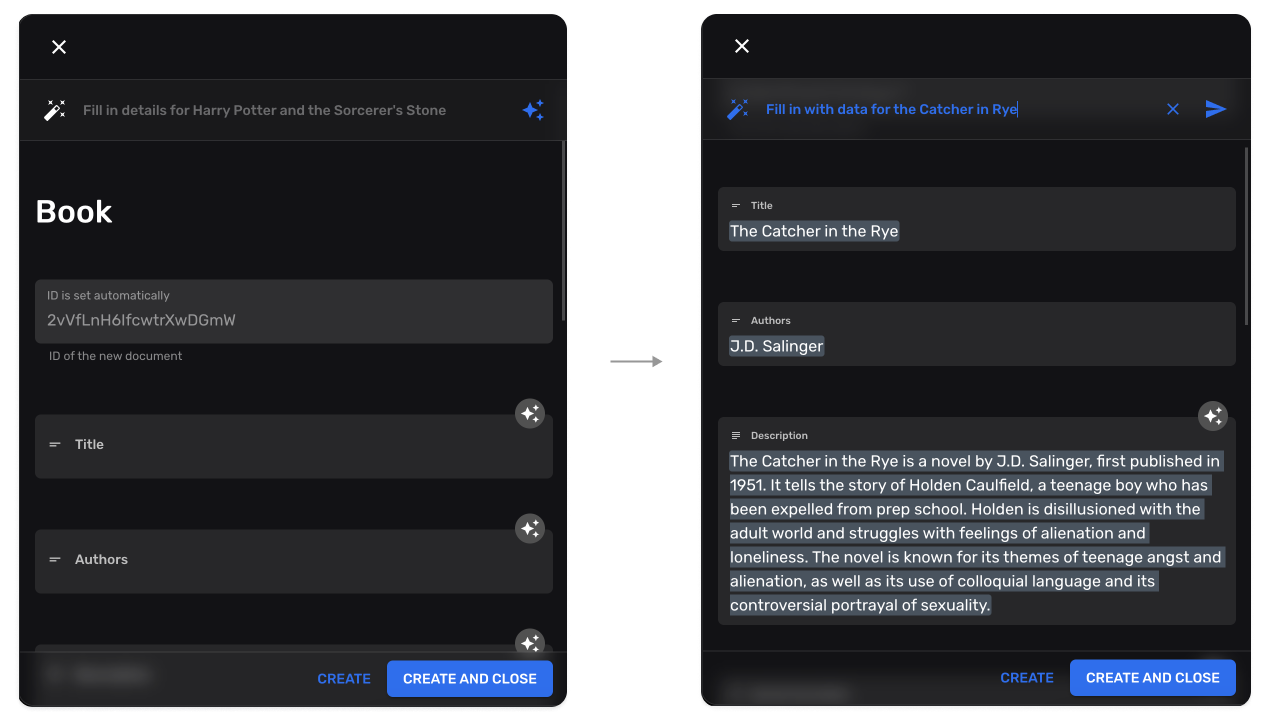
Section titled “Data Enhancement Plugin”AI-powered field autocompletion:
import { useDataEnhancementPlugin } from "@rebasepro/plugin-ai";
const enhancementPlugin = useDataEnhancementPlugin();
It adds an Autofill action to every form, and an Autocomplete slash command
to every markdown field, which continues the text from the cursor. Both appear
only where the plugin is enabled: the service reports itself available and
getConfigForPath (when you pass one) allows the collection. A field whose
customProps.editorProps.aiController names a controller of its own uses that
one. Since 0.25 Another plugin can give markdown fields a controller the same way, with
EditorAIControllerProvider from @rebasepro/cms in a form-scoped provider.
Collection Injection
Section titled “Collection Injection”Plugins can dynamically add new collections:
hooks: { // Receives the resolved collections and returns the full list to use. injectCollections: (collections) => [...collections, auditLogCollection]}Collection Modification
Section titled “Collection Modification”Plugins can modify existing collections:
hooks: { // Receives one collection, returns the modified one. modifyCollection: (collection) => ({ ...collection, properties: { ...collection.properties, last_modified_by: { type: "string", name: "Modified By", admin: { readOnly: true } } } })}modifyCollection is synchronous, and the admin applies it when it resolves
its collections, not each time the plugin changes. When the change needs data
you have to fetch, fetch it before rendering <Rebase> and build the plugin
from what came back:
import { useEffect, useMemo, useState } from "react";import { Rebase, useRebaseAuthController } from "@rebasepro/app";import { RebaseCMS, RebaseShell } from "@rebasepro/cms";import type { RebasePlugin } from "@rebasepro/cms-types";import { CircularProgressCenter } from "@rebasepro/ui";
export function App() {    const authController = useRebaseAuthController({ client });    const [labels, setLabels] = useState<Record<string, string>>();
    useEffect(() => {        fetch("/collection-labels.json")            .then((response) => response.json())            .then(setLabels);    }, []);
    const labelsPlugin = useMemo<RebasePlugin | undefined>(() => labels && {        key: "collection_labels",        hooks: {            modifyCollection: (collection) => ({                ...collection,                name: labels[collection.slug] ?? collection.name            })        }    }, [labels]);
    if (!labelsPlugin) return <CircularProgressCenter/>;
    return (        <Rebase client={client} authController={authController} plugins={[labelsPlugin]}>            <RebaseCMS collections={collections}/>            <RebaseShell title="My App"/>        </Rebase>    );}
Since 0.25
hooks.modifyCollectionAsync is deprecated. Nothing ever called it, on 0.24
or before. A plugin that sets it still compiles, and <Rebase> warns once per
plugin. Use modifyCollection as above.
Next Steps
Section titled “Next Steps”- Studio Tools — SQL console, JS console, RLS editor
- Custom Fields — Building custom form fields