
Plugin-System
Übersicht
Abschnitt betitelt „Übersicht“Plugins sind ein Konzept des Admin-Panels. Sie laufen im Browser, innerhalb des React-Admins, und werden dort registriert, wo Sie es erstellen. Nichts auf dieser Seite greift auf das Backend zu: Ein Plugin kann weder eine Route noch einen Callback oder einen Cron hinzufügen. Siehe hierzu Custom Functions, Entity Callbacks und Cron Jobs.
Plugins sind der primäre Erweiterungsmechanismus im Panel. Sie können:
- Die gesamte App mit einem Provider kapseln (Kontext, State-Management)
- Aktionen für die Startseite und Widgets hinzufügen
- Komponenten für die Collection-Ansicht injizieren (Toolbar, Column Builder)
- Formular-Komponenten hinzufügen (Field Builder, zusätzliche Panels)
- Collections dynamisch injizieren oder modifizieren
Plugin-Interface
Abschnitt betitelt „Plugin-Interface“interface RebasePlugin { key: string; // Unique identifier loading?: boolean; // Hold admin content until the plugin is ready
// UI contributions — a flat array, each entry naming its slot. // This replaced the old per-area objects (homePage, collectionView, form). slots?: SlotContribution[];
// HOC providers. `scope: "root"` wraps the whole admin below // RebaseContext; `scope: "form"` wraps each entity form / edit view. providers?: PluginProvider[];
// Behavioural (non-UI) hooks: collection modification and injection, // column reordering, navigation entries. hooks?: PluginHooks;
// Custom field rendering (e.g. data enhancement). fieldBuilder?: FieldBuilderConfig;
// Views added to the navigation automatically. views?: AppView[];
// onMount, onAuthStateChange, onUnmount — see below. lifecycle?: PluginLifecycle;}Jede dieser Eigenschaften ist optional, außer key. Die vollständige Liste der Slot-Namen finden Sie auf
der Seite Slots.
Lebenszyklus
Abschnitt betitelt „Lebenszyklus“onMount(context)wird einmal ausgeführt, sobald die Authentifizierung zum ersten Mal bereit ist: Ein Benutzer ist angemeldet, oder die Anmeldung wurde übersprungen.onAuthStateChange(user)wird bei jedem späteren Benutzerwechsel ausgeführt: mit dem neuen Benutzer bei einer Anmeldung, mitnullbei einer Abmeldung. Das Plugin bleibt dabei in beiden Fällen gemountet.onUnmount()wird ausgeführt, wenn<Rebase>unmountet wird.
Seit 0.25
lifecycle.onCollectionChange ist veraltet (deprecated). Es wurde nie aufgerufen, weder
unter 0.24 noch davor. Ein Plugin, das es setzt, kompiliert weiterhin, und <Rebase> warnt
einmal pro Plugin. Um die Zeilen einer Collection zu verfolgen, abonnieren Sie in onMount
und kündigen in onUnmount:
import type { RebasePlugin } from "@rebasepro/cms-types";
let stopListening: (() => void) | undefined;
const openOrdersPlugin: RebasePlugin = {    key: "open_orders",    lifecycle: {        onMount: (context) => {            stopListening = context.data.collection("orders").listen(                { where: { status: ["==", "open"] } },                ({ data }) => console.log(`${data.length} open orders`)            );        },        onUnmount: () => stopListening?.()    }};
Plugins verwenden
Abschnitt betitelt „Plugins verwenden“Plugins werden an <Rebase> übergeben, neben dem Client. Alles darunter – die
Navigation, die Collection-Ansichten, die Formulare – liest sie von dort:
import { Rebase, useRebaseAuthController } from "@rebasepro/app";import { RebaseCMS, RebaseShell } from "@rebasepro/cms";import { useDataEnhancementPlugin } from "@rebasepro/plugin-ai";
export function App() {    const authController = useRebaseAuthController({ client });    const dataEnhancementPlugin = useDataEnhancementPlugin();
    return (        <Rebase            client={client}            authController={authController}            plugins={[dataEnhancementPlugin]}        >            <RebaseCMS collections={collections}/>            <RebaseShell title="My App"/>        </Rebase>    );}
Plugins werden normalerweise über einen Hook erstellt, sodass das Array bei jedem Render-Vorgang neu aufgebaut wird;
das ist in Ordnung und der Grund dafür, dass plugins eine Prop ist und nicht
manuell memoriert werden muss. Zwei Plugins mit demselben key sind ein Fehler – <Rebase>
protokolliert Duplikate, anstatt sie stillschweigend zu verwerfen.
Für einen einzelnen Beitrag benötigen Sie überhaupt kein Plugin: <Rebase slots>
akzeptiert dieselben SlotContribution-Einträge direkt.
Bei manueller Komposition
Abschnitt betitelt „Bei manueller Komposition“Nur wenn Sie <RebaseShell> durch die darunterliegenden Layer ersetzt haben,
muss die Plugin-Liste manuell an den Navigation-Controller übergeben werden:
const navigationStateController = useBuildNavigationStateController({ plugins, collections: () => collections, // These four are required — the controller resolves navigation against them. authController, data, collectionRegistryController, urlController});<RebaseNavigation> übernimmt genau diesen Aufruf für Sie und liest plugins aus dem
Customization-Controller, den <Rebase> bereitstellt. Siehe
Erweitert: Manuelles Layout.
Ein Plugin erstellen
Abschnitt betitelt „Ein Plugin erstellen“Hier ist ein minimales Plugin, das jeder Collection eine Toolbar-Aktion hinzufügt:
import type { RebasePlugin } from "@rebasepro/cms-types";
function useMyPlugin(): RebasePlugin {    return {        key: "my_plugin",
        // `slots` is a flat array of contributions, each naming its slot.        // See the Slots page for the full list of slot names.        slots: [            { slot: "collection.actions", Component: MyToolbarAction }        ],
        // `fieldBuilder` is top-level and takes a `wrap` function that returns        // a *component* (or null to leave the field as it is) — it is not        // a render function and no longer lives under `form`.        fieldBuilder: {            wrap: ({ property }) =>                property.propertyConfig === "my_custom_field" ? MyCustomField : null        }    };}
Feld-Wrapper aus mehreren Plugins
Abschnitt betitelt „Feld-Wrapper aus mehreren Plugins“Seit 0.25 Unter 0.24 erhielt das wrap
jedes Plugins das integrierte Feld, und nur der zuletzt zurückgegebene Wrapper wurde
gerendert.
Wrapper aus mehreren Plugins werden in der Reihenfolge des plugins-Arrays komponiert.
Das wrap jedes Plugins erhält als params.Field das Feld so, wie die Plugins davor es
hinterlassen haben, sodass der Wrapper des ersten Plugins am innersten liegt und der des
letzten am äußersten. Ein Plugin, dessen wrap null zurückgibt oder dessen
enabled-Guard für das Feld false zurückgibt, reicht es unverändert weiter. Ein
Wrapper, der Field rendert, behält daher jeden Wrapper davor:
import type { RebasePlugin } from "@rebasepro/cms-types";import { Typography } from "@rebasepro/ui";
const descriptionPlugin: RebasePlugin = {    key: "description_below",    fieldBuilder: {        // `Field` is the built-in field, or the earlier plugins' wrapper of it.        wrap: ({ Field, property }) => property.description            ? (props) => (                <>                    <Field {...props}/>                    <Typography variant="caption" color="secondary">                        {property.description}                    </Typography>                </>            )            : null    }};
Integrierte Plugins
Abschnitt betitelt „Integrierte Plugins“Data Enhancement Plugin
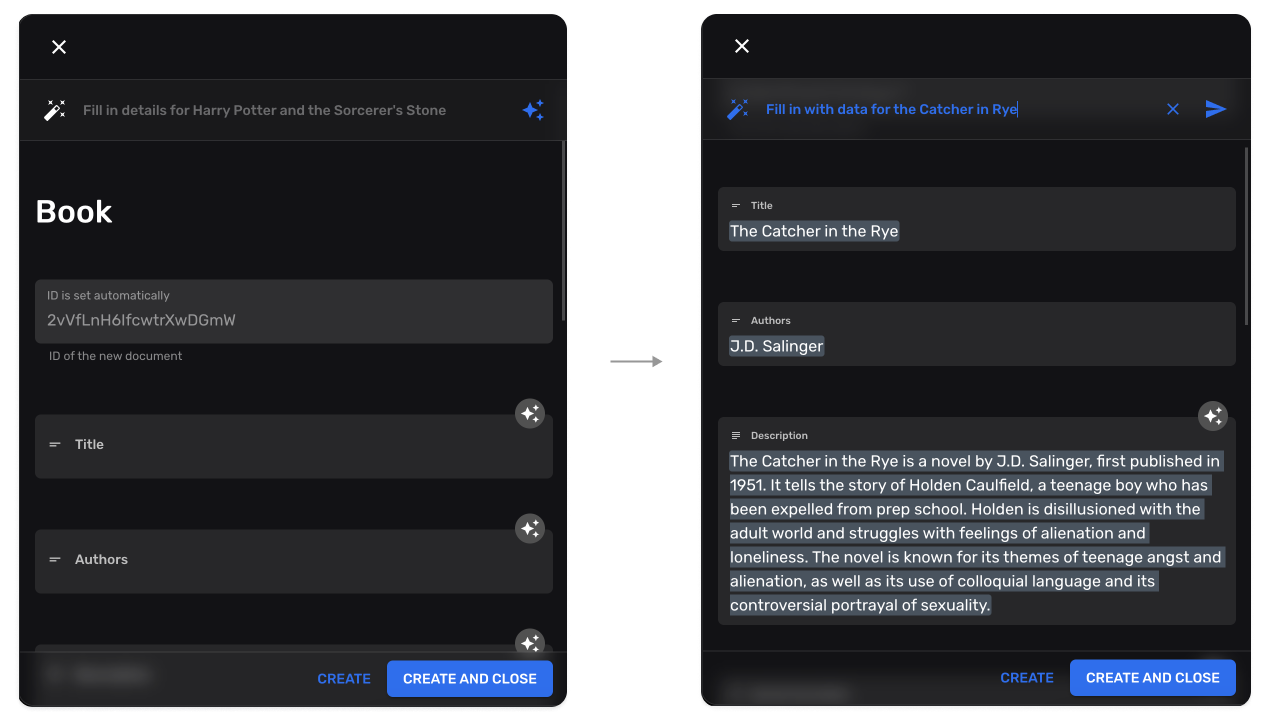
Abschnitt betitelt „Data Enhancement Plugin“KI-gestützte Feld-Autovervollständigung:
import { useDataEnhancementPlugin } from "@rebasepro/plugin-ai";
const enhancementPlugin = useDataEnhancementPlugin();
Es fügt jedem Formular eine Autofill-Aktion hinzu und jedem Markdown-Feld einen
Autocomplete-Slash-Befehl, der den Text ab dem Cursor fortsetzt. Beide erscheinen
nur dort, wo das Plugin aktiviert ist: Der Dienst meldet sich als verfügbar und
getConfigForPath (sofern Sie eines übergeben) erlaubt die Collection. Ein Feld, dessen
customProps.editorProps.aiController einen eigenen Controller nennt, verwendet
diesen. Seit 0.25 Ein anderes Plugin kann Markdown-Feldern auf dieselbe Weise einen Controller geben, mit
EditorAIControllerProvider aus @rebasepro/cms in einem formularbezogenen Provider.
Collection-Injection
Abschnitt betitelt „Collection-Injection“Plugins können dynamisch neue Collections hinzufügen:
hooks: { // Receives the resolved collections and returns the full list to use. injectCollections: (collections) => [...collections, auditLogCollection]}Collection-Modifikation
Abschnitt betitelt „Collection-Modifikation“Plugins können bestehende Collections modifizieren:
hooks: { // Receives one collection, returns the modified one. modifyCollection: (collection) => ({ ...collection, properties: { ...collection.properties, last_modified_by: { type: "string", name: "Modified By", admin: { readOnly: true } } } })}modifyCollection ist synchron, und das Admin-Panel wendet es an, wenn es seine
Collections auflöst, nicht jedes Mal, wenn sich das Plugin ändert. Wenn die Änderung Daten
braucht, die Sie abrufen müssen, rufen Sie sie ab, bevor Sie <Rebase> rendern, und bauen
Sie das Plugin aus dem, was zurückkam:
import { useEffect, useMemo, useState } from "react";import { Rebase, useRebaseAuthController } from "@rebasepro/app";import { RebaseCMS, RebaseShell } from "@rebasepro/cms";import type { RebasePlugin } from "@rebasepro/cms-types";import { CircularProgressCenter } from "@rebasepro/ui";
export function App() {    const authController = useRebaseAuthController({ client });    const [labels, setLabels] = useState<Record<string, string>>();
    useEffect(() => {        fetch("/collection-labels.json")            .then((response) => response.json())            .then(setLabels);    }, []);
    const labelsPlugin = useMemo<RebasePlugin | undefined>(() => labels && {        key: "collection_labels",        hooks: {            modifyCollection: (collection) => ({                ...collection,                name: labels[collection.slug] ?? collection.name            })        }    }, [labels]);
    if (!labelsPlugin) return <CircularProgressCenter/>;
    return (        <Rebase client={client} authController={authController} plugins={[labelsPlugin]}>            <RebaseCMS collections={collections}/>            <RebaseShell title="My App"/>        </Rebase>    );}
Seit 0.25
hooks.modifyCollectionAsync ist veraltet (deprecated). Es wurde nie aufgerufen, weder
unter 0.24 noch davor. Ein Plugin, das es setzt, kompiliert weiterhin, und <Rebase> warnt
einmal pro Plugin. Verwenden Sie modifyCollection wie oben.
Nächste Schritte
Abschnitt betitelt „Nächste Schritte“- Studio-Tools – SQL-Konsole, JS-Konsole, RLS-Editor
- Benutzerdefinierte Felder – Erstellen benutzerdefinierter Formularfelder