
Sistema dei plugin
Panoramica
Sezione intitolata “Panoramica”I plugin sono un concetto relativo al pannello di amministrazione. Vengono eseguiti nel browser, all’interno dell’admin React, e sono registrati nel punto in cui lo crei. Nulla in questa pagina raggiunge il backend: un plugin non può aggiungere una route, una callback o un cron job. Per questi, consulta Custom Functions, Entity Callbacks e Cron Jobs.
I plugin costituiscono il meccanismo primario di estensione nel pannello. Possono:
- Avvolgere l’intera app con un provider (contesto, gestione dello stato)
- Aggiungere azioni per la home page e widget
- Inserire componenti per la vista delle collection (barra degli strumenti, column builder)
- Aggiungere componenti per i form (field builder, pannelli aggiuntivi)
- Iniettare o modificare collection in modo dinamico
Interfaccia dei plugin
Sezione intitolata “Interfaccia dei plugin”interface RebasePlugin { key: string; // Unique identifier loading?: boolean; // Hold admin content until the plugin is ready
// UI contributions — a flat array, each entry naming its slot. // This replaced the old per-area objects (homePage, collectionView, form). slots?: SlotContribution[];
// HOC providers. `scope: "root"` wraps the whole admin below // RebaseContext; `scope: "form"` wraps each entity form / edit view. providers?: PluginProvider[];
// Behavioural (non-UI) hooks: collection modification and injection, // column reordering, navigation entries. hooks?: PluginHooks;
// Custom field rendering (e.g. data enhancement). fieldBuilder?: FieldBuilderConfig;
// Views added to the navigation automatically. views?: AppView[];
// onMount, onAuthStateChange, onUnmount — see below. lifecycle?: PluginLifecycle;}Ognuna di queste proprietà è facoltativa tranne key. L’elenco completo dei nomi degli slot è disponibile nella pagina Slots.
Ciclo di vita
Sezione intitolata “Ciclo di vita”onMount(context)viene eseguito una volta, quando l’autenticazione è pronta per la prima volta: un utente ha effettuato l’accesso, oppure l’accesso è stato saltato.onAuthStateChange(user)viene eseguito a ogni successivo cambio di utente: con il nuovo utente all’accesso, connullalla disconnessione. Il plugin resta montato in entrambi i casi.onUnmount()viene eseguito quando<Rebase>viene smontato.
Da 0.25
lifecycle.onCollectionChange è deprecato. Nessuno lo ha mai chiamato, su 0.24
o prima. Un plugin che lo imposta continua a compilare, e <Rebase> avvisa una
volta per plugin. Per seguire le righe di una collection, sottoscrivi da onMount e
annulla la sottoscrizione in onUnmount:
import type { RebasePlugin } from "@rebasepro/cms-types";
let stopListening: (() => void) | undefined;
const openOrdersPlugin: RebasePlugin = {    key: "open_orders",    lifecycle: {        onMount: (context) => {            stopListening = context.data.collection("orders").listen(                { where: { status: ["==", "open"] } },                ({ data }) => console.log(`${data.length} open orders`)            );        },        onUnmount: () => stopListening?.()    }};
Utilizzo dei plugin
Sezione intitolata “Utilizzo dei plugin”I plugin vengono passati a <Rebase>, accanto al client. Tutto ciò che si trova al di sotto di esso — la navigazione, le viste delle collection, i form — li legge da lì:
import { Rebase, useRebaseAuthController } from "@rebasepro/app";import { RebaseCMS, RebaseShell } from "@rebasepro/cms";import { useDataEnhancementPlugin } from "@rebasepro/plugin-ai";
export function App() {    const authController = useRebaseAuthController({ client });    const dataEnhancementPlugin = useDataEnhancementPlugin();
    return (        <Rebase            client={client}            authController={authController}            plugins={[dataEnhancementPlugin]}        >            <RebaseCMS collections={collections}/>            <RebaseShell title="My App"/>        </Rebase>    );}
I plugin vengono solitamente creati tramite un hook, quindi l’array viene ricreato a ogni render; questo è normale ed è il motivo per cui plugins è una prop anziché qualcosa da memorizzare manualmente. Due plugin con la stessa key rappresentano un errore — <Rebase> registra i duplicati nei log anziché scartarne uno silenziosamente.
Per un singolo contributo non hai affatto bisogno di un plugin: <Rebase slots> accetta direttamente le stesse voci SlotContribution.
In caso di composizione manuale
Sezione intitolata “In caso di composizione manuale”Solo se hai sostituito <RebaseShell> con i layer sottostanti, l’elenco dei plugin deve essere inoltrato manualmente al navigation controller:
const navigationStateController = useBuildNavigationStateController({ plugins, collections: () => collections, // These four are required — the controller resolves navigation against them. authController, data, collectionRegistryController, urlController});<RebaseNavigation> esegue esattamente questa chiamata per te, leggendo plugins dal customization controller fornito da <Rebase>. Consulta Advanced: manual layout.
Creazione di un plugin
Sezione intitolata “Creazione di un plugin”Ecco un plugin minimale che aggiunge un’azione alla barra degli strumenti per ogni collection:
import type { RebasePlugin } from "@rebasepro/cms-types";
function useMyPlugin(): RebasePlugin {    return {        key: "my_plugin",
        // `slots` is a flat array of contributions, each naming its slot.        // See the Slots page for the full list of slot names.        slots: [            { slot: "collection.actions", Component: MyToolbarAction }        ],
        // `fieldBuilder` is top-level and takes a `wrap` function that returns        // a *component* (or null to leave the field as it is) — it is not        // a render function and no longer lives under `form`.        fieldBuilder: {            wrap: ({ property }) =>                property.propertyConfig === "my_custom_field" ? MyCustomField : null        }    };}
Wrapper di campo da più plugin
Sezione intitolata “Wrapper di campo da più plugin”Da 0.25 Su 0.24 il wrap di ogni
plugin riceveva il campo integrato, e veniva renderizzato solo l’ultimo wrapper
restituito.
I wrapper di più plugin si compongono, nell’ordine dell’array plugins.
Il wrap di ciascun plugin riceve, come params.Field, il campo così come lo hanno
lasciato i plugin precedenti, quindi il wrapper del primo plugin è il più interno e quello
dell’ultimo il più esterno. Un plugin il cui wrap restituisce null, o la cui guardia
enabled restituisce false per il campo, lo passa avanti invariato. Un wrapper che
renderizza Field mantiene quindi tutti i wrapper che lo precedono:
import type { RebasePlugin } from "@rebasepro/cms-types";import { Typography } from "@rebasepro/ui";
const descriptionPlugin: RebasePlugin = {    key: "description_below",    fieldBuilder: {        // `Field` is the built-in field, or the earlier plugins' wrapper of it.        wrap: ({ Field, property }) => property.description            ? (props) => (                <>                    <Field {...props}/>                    <Typography variant="caption" color="secondary">                        {property.description}                    </Typography>                </>            )            : null    }};
Plugin integrati
Sezione intitolata “Plugin integrati”Plugin Data Enhancement
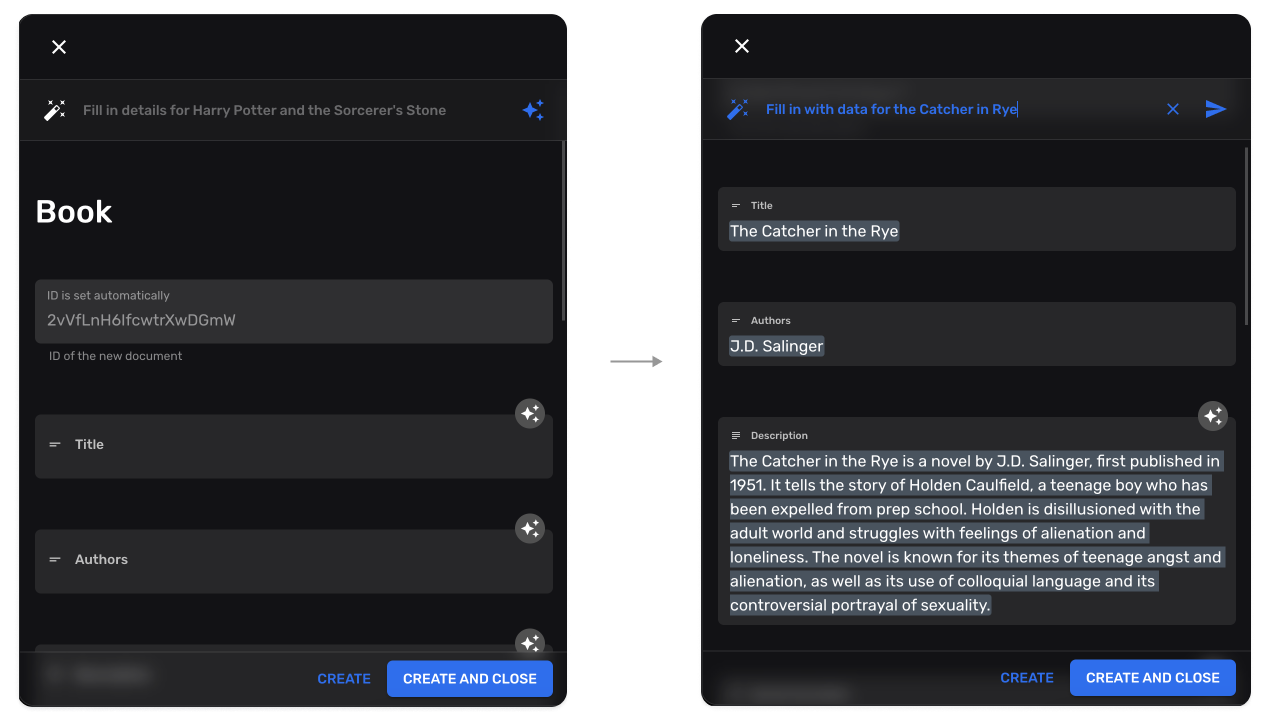
Sezione intitolata “Plugin Data Enhancement”Completamento automatico dei campi basato sull’IA:
import { useDataEnhancementPlugin } from "@rebasepro/plugin-ai";
const enhancementPlugin = useDataEnhancementPlugin();
Aggiunge un’azione Autofill a ogni form, e un comando slash Autocomplete
a ogni campo markdown, che continua il testo dal cursore. Entrambi compaiono
solo dove il plugin è abilitato: il servizio si dichiara disponibile e
getConfigForPath (quando ne passi uno) consente la collection. Un campo il cui
customProps.editorProps.aiController nomina un controller proprio usa
quello. Da 0.25 Un altro plugin può dare ai campi markdown un controller allo stesso modo, con
EditorAIControllerProvider da @rebasepro/cms in un provider con ambito form.
Iniezione di collection
Sezione intitolata “Iniezione di collection”I plugin possono aggiungere nuove collection dinamicamente:
hooks: { // Receives the resolved collections and returns the full list to use. injectCollections: (collections) => [...collections, auditLogCollection]}Modifica delle collection
Sezione intitolata “Modifica delle collection”I plugin possono modificare le collection esistenti:
hooks: { // Receives one collection, returns the modified one. modifyCollection: (collection) => ({ ...collection, properties: { ...collection.properties, last_modified_by: { type: "string", name: "Modified By", admin: { readOnly: true } } } })}modifyCollection è sincrono, e l’admin lo applica quando risolve le proprie collection,
non a ogni cambiamento del plugin. Quando la modifica richiede dati da recuperare,
recuperali prima di renderizzare <Rebase> e costruisci il plugin a partire da ciò che è
tornato:
import { useEffect, useMemo, useState } from "react";import { Rebase, useRebaseAuthController } from "@rebasepro/app";import { RebaseCMS, RebaseShell } from "@rebasepro/cms";import type { RebasePlugin } from "@rebasepro/cms-types";import { CircularProgressCenter } from "@rebasepro/ui";
export function App() {    const authController = useRebaseAuthController({ client });    const [labels, setLabels] = useState<Record<string, string>>();
    useEffect(() => {        fetch("/collection-labels.json")            .then((response) => response.json())            .then(setLabels);    }, []);
    const labelsPlugin = useMemo<RebasePlugin | undefined>(() => labels && {        key: "collection_labels",        hooks: {            modifyCollection: (collection) => ({                ...collection,                name: labels[collection.slug] ?? collection.name            })        }    }, [labels]);
    if (!labelsPlugin) return <CircularProgressCenter/>;
    return (        <Rebase client={client} authController={authController} plugins={[labelsPlugin]}>            <RebaseCMS collections={collections}/>            <RebaseShell title="My App"/>        </Rebase>    );}
Da 0.25
hooks.modifyCollectionAsync è deprecato. Nessuno lo ha mai chiamato, su 0.24
o prima. Un plugin che lo imposta continua a compilare, e <Rebase> avvisa una
volta per plugin. Usa modifyCollection come sopra.
Passaggi successivi
Sezione intitolata “Passaggi successivi”- Studio Tools — Console SQL, console JS, editor RLS
- Custom Fields — Creazione di campi form personalizzati